Sunday, 25 December 2016

Google Chrome Settings

In Advanced Settings

Password And Forms:
you can add auto fill settings like address,phone number
you can see the saved passwords

AT THE BOTTOM CORMER IN ADVANCED SETTINGS YOU CAN RESET TRHE CHROME
NOTE: AFTER RESETTING ALL SAVED PASSWORDS AND LOGIN REMAIN SAME


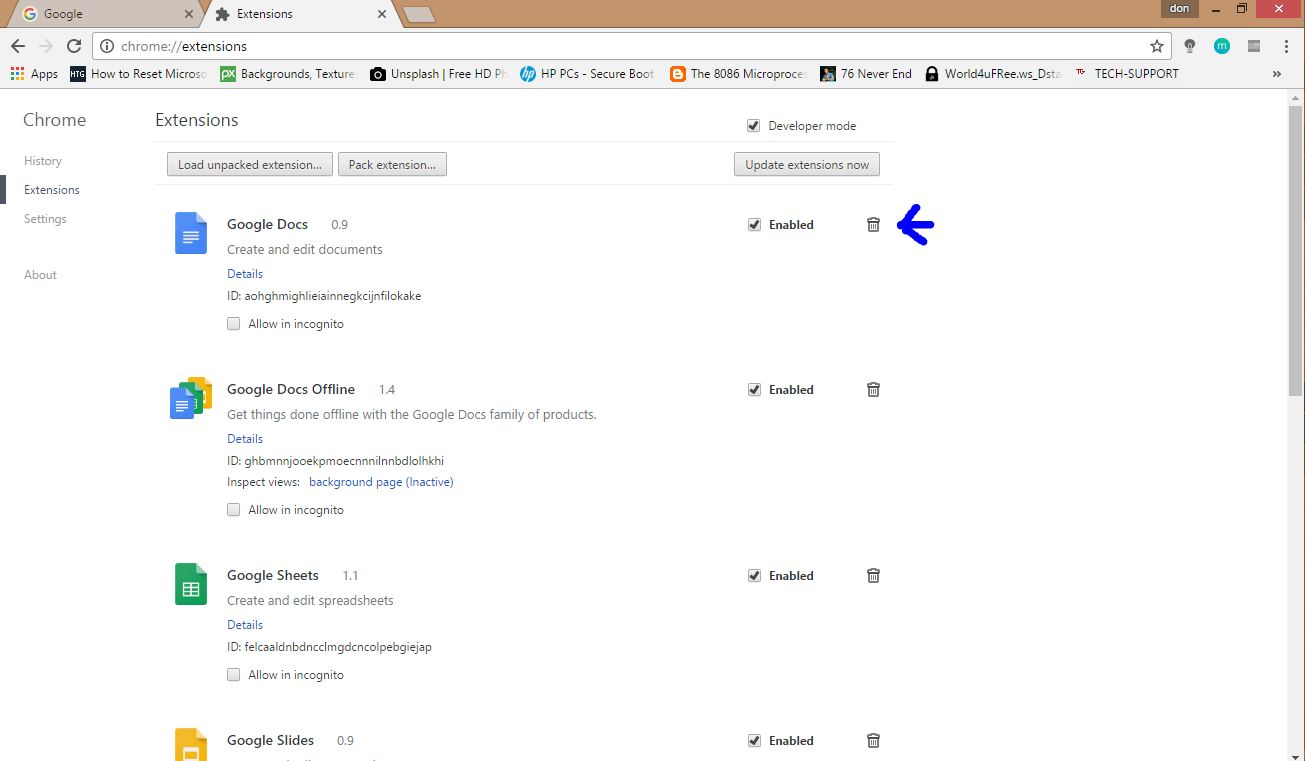
EXTENSIONS:
In Extensions you can delete unused extensions and you can add more extensions or themes by clicking on "GET EXTENSION" option


Google Chrome Optimization

For Older Version :
At the top right corner there are 3 dots just click on it after that click on settings


In settings there are many options which you can change
Sign In Option :
As you know Google Chrome is developed by "GOOGLE" so you can sign in google chrome

Benefits For Signing:
All the bookmarks will save if you uninstall the google chrome

On Startup:
 You can set a startup page which you can set according to your desire,which page you want to set as a default page

Continue where you left off:
It open the page where you left the pages last time.It open the same page where you left last time

Open a specific pages:
In this option you can set multiple pages on startup for chrome


IN APPEARENCE YOU CAN SET DIFFERENT THEMES FROM INSTALLING EXTENSIONS(IN EXTENSION OPTION)

IN PEOPLE YOU CAN ADD DIFFERENT USERS IN GOOGLE CHROME JUST LIKE A 2 ACCOUNTS IN A COMPUTER

ADVANCED SETTINGS :

In advanced settings you can clear browsing history by selecting :past hours,at beginning of time


you can check mark passwords and auto fill form data if you want to remove it ,otherwise make it uncheck marked.

Sunday, 18 December 2016

TWEEKS FOR THE WINDOWS

MANAUL OPTIMIZATION OF COMPUTER

1.CLEANING TEMPORARY FILES
HOLDING DOWN WINDOWS AND R� KEY ON THE KEYBOARD ,RUN BOX APPEAR ON THE COMPUTER 
IN RUN BOX TYPE TEMP AND DELETE ALL THE FILES if some files are not deleted so leave as it is because these files are in use by windows


 DELETE ALL THE FILES if some files are not deleted so leave as it is because these files are in use by windows
After that again open run box and type %temp% then delete all the files if some files are not deleted so leave as it is because these files are in use by windows


After that again open run box and type prefetch then delete all the files f some files are not deleted so leave as it is because these files are in use by windows


2.DISK CLEANUP
  Open run box and type cleanmgr,then it shows the list of the drive now then select c drive (because generally windows is installed in c drive)
You can select different drive also for cleaning 


After that you have to check mark all the boxes and then click on OK option


3.SOFTWARE REMOVAL
   Remove the softwares which you don�t want to use,open run box and type "appwiz.cpl" and remove the softwares by double clicking on that software 


4.SYSTEM CONFIGURATION
  You can set boot time and startup softwares ,open run box and type msconfig


Always select normal startup and in Boot Options select it to 3 seconds


Select services tab after that check hide all the microsoft services  after that check mark those software which you use  after that uncheck all the update services like google update ,dropbox update
After that click on startup and select those softwares which you want to run at startup
After that hit on ok if is it ask for restart then restart the computer 

Thursday, 8 December 2016

Google Translate's 5000 Character Limit

For some reason, Google Translate now has a limit of 5000 characters per translation. There's even a character counter at the bottom of the input box. If you happen to paste a long text that has more than 5000 characters, you'll get an error message ("maximum characters exceeded: X characters over 5000 maximum") and a "translate more" option that lets you translate the rest of the text.


I don't understand the purpose of this restriction, considering that Google doesn't impose any limitation when translating web pages. It's worth pointing out that Google Translate's API has a similar limitation: "the maximum size of each text to be translated is 5000 characters, not including any HTML tags". Google's translation card from Google Search has a different limit: about 2800 characters.

Google Tests Movie Ratings

Google's knowledge graph card tests a feature that lets you like or dislike movies and TV shows. For example, when you search for "It's a Wonderful Life", you can click like or dislike and check the percentage of Google users who liked it.


The same buttons show up when you search for a TV show like "Saturday Night Live".


Search Engine Land reports that Google confirmed this experiment, which was first spotted last month.

Tuesday, 6 December 2016

Google's Holiday Decorations

When you search Google for [Christmas], [Hanukkah], [Kwanzaa], [Festivus] or other related queries, you'll see some special decorations related to each holiday. Festivus is "a holiday celebrated by those seeking an alternative to the commercialism and pressures of the Christmas holiday season."

Christmas trees, Santa Claus, the Christmas star adorn the Google search page and bring the hoiday spirit.


The Hanukkah menorah and Kwanzaa's Mishumaa Saba (The Seven Candles) are lighting up Google's search pages.


Here are the decorations from 2015, 2014, 2013, 2012 and 2011.

New Interface for Google Search

Google's desktop search pages have a new interface for navigating between search results. The search box is bigger, there's a new search icon and Google now only shows 2 or 3 specialized search engines next to "all", down from 4. Apps and shopping seem to be missing from the list of search engines, so you can only pick from image search, video search, Google News, Google Maps, Google Flights and Google Books.


The settings dropdown is now placed below the search box and it includes the option that lets you hide private results. You can still change search settings, languages, turn on or turn off SafeSearch, use advanced search options, open Web History or go to the help center.


Search tools are now simply called tools and they include the same options: search by date and verbatim.


Image search lets you quickly go to the saved images page and change SafeSearch setting.


Google Shopping is broken. While the homepage still loads, when you click a product image or search for something, Google shows an empty page.


Here's the old Google Search interface, via Wikipedia: